

Listen to this article in summarized format
×
Subscribe to

Unlock AI Briefing and Premium Content
New Year Offer 24 Hours Left
Subscribe NowAlready a member? Sign In
What's Included
- Exclusive Stories
- Daily ePaper Access
- Smart Market Tools
- Curated Investment Ideas
- Ad-lite Experience
Subscription

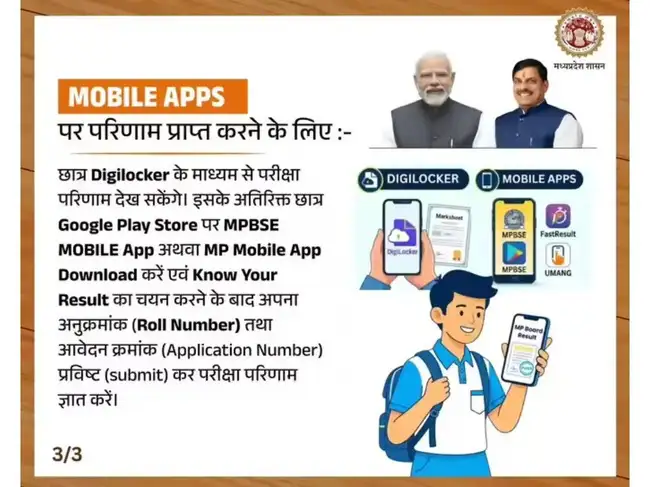
Students waiting for the MP Board Class 10 and 12 results have more than one way to access their scores. After the result announcement the main official website may not work due to a high amount of traffic. In that case, MP Board class 10 and class 12 students can also check their results on DigiLocker. The DigiLocker site and DigiLocker App have become a reliable option for quickly downloading digital marksheets. Once the results are declared, students can log in and access verified documents within minutes.
Also Read: mpbse.mponline.gov.in MP Board Class 10 result site not working? Check these alternate links to quickly get the scorecard
Students who already have an account can directly log in, while new users can register in a few steps.
Visit the official DigiLocker website: www.digilocker.gov.in
Click on “Login/Register” on the homepage
Sign up using your mobile number and Aadhaar details (if not already registered)
After logging in, go to the “Get Documents” section
Select your board as MPBSE
Enter your roll number, exam year, and other required details
Submit the information to view your marksheet
Download or save the document for future use
Also Read: Check all the live updates about MP Board 10 12 Results 2026
Also Read: MP Board Class 12 Results 2026 out today at mpbse.mponline.gov.in Check time, direct link
(You can now subscribe to our Economic Times WhatsApp channel)
Also Read: mpbse.mponline.gov.in MP Board Class 10 result site not working? Check these alternate links to quickly get the scorecard
Why DigiLocker is useful for students
DigiLocker allows students to store and access official academic documents in digital form. The marksheet available here is considered valid for admissions and other formal uses. It also removes the need to carry physical copies immediately after results are announced.Students who already have an account can directly log in, while new users can register in a few steps.
How to check MP Board result on DigiLocker website
Students can follow these steps to access their results online:
Visit the official DigiLocker website: www.digilocker.gov.in
Click on “Login/Register” on the homepage
Sign up using your mobile number and Aadhaar details (if not already registered)
After logging in, go to the “Get Documents” section
Select your board as MPBSE
Enter your roll number, exam year, and other required details
Submit the information to view your marksheet
Download or save the document for future use
Also Read: Check all the live updates about MP Board 10 12 Results 2026
How to check MP Board result 2026 using DigiLocker app
For students who prefer mobile access, the DigiLocker app offers a similar process:- Download the DigiLocker app from the Play Store or App Store
- Log in or create a new account
- Go to the “Issued Documents” or “Get Documents” section
- Choose MP Board (MPBSE) from the list
- Enter your roll number and required details
- View and download your marksheet instantly
MP Board result 2026: What to keep ready before checking
Students should keep a few details handy to avoid delays:- Roll number
- Application or registration number
- Registered mobile number
Also Read: MP Board Class 12 Results 2026 out today at mpbse.mponline.gov.in Check time, direct link
Is the DigiLocker marksheet valid?
Yes, the digital marksheet available on DigiLocker is officially issued and can be used for admissions, verification, and other academic purposes. However, students should still collect their original marksheets from their schools when they are distributed.Add  as a Reliable and Trusted News Source
as a Reliable and Trusted News Source Add Now!
(You can now subscribe to our Economic Times WhatsApp channel)












 ETPrime Membership